-
0. GitHub Desktop 설치 ~ Repository 연결KH/TEAMPROJECT 2022. 10. 13. 21:29
1.
다운로드 후 설치 - https://desktop.github.com/

2.
실행 수 로그인
방법 1) File > Option > Accounts > Sign in
방법 2) Clone a repository from the Internet... 클릭 후 로그인

3.
기존 Repository 연결
File > New Repository(Ctr+N)
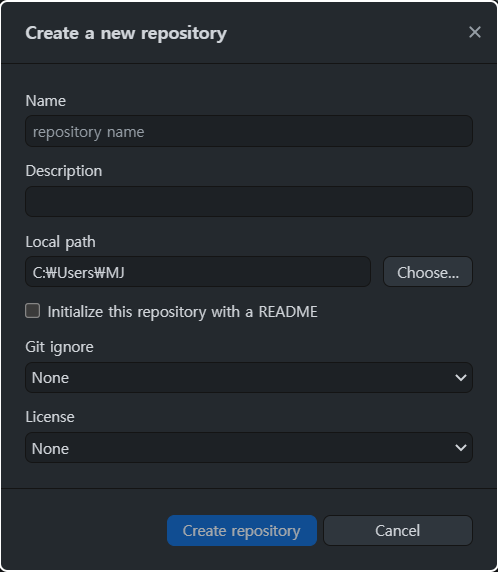
5. Local path에 기존 Repository 경로를 입력
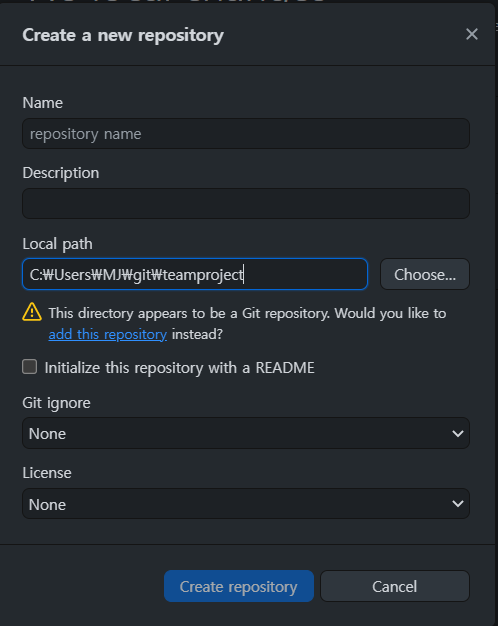
add this repository > Create repository 6.

Add repository 4.
결과

current repository와 current branch를 잘 확인 하고 사용하자 연결이 잘 되었다면 코드를 변경 후 파일을 저장하면 Github Desktop에서 변경사항을 확인할 수 있다

'KH > TEAMPROJECT' 카테고리의 다른 글
1. DB 계정 (0) 2022.10.19 0.Github Desktop 새 branch 생성 (0) 2022.10.14 0. Repository 권한 부여 (0) 2022.10.14 0. gitignore 설정 (0) 2022.10.14 0. 프로젝트 공유를 위한 GitHub - STS 연동 (Clone) (0) 2022.10.13